During my three years on the Ford Personal Profiles On-boarding Feature project, I collaborated with a team of designers and engineers to create a more streamlined and user-friendly experience for model year '24 vehicles. Our goal was to simplify the onboarding process, reduce screen count, and ensure users could easily access and customize their preferences as soon as they entered the vehicle. This project required a balance between ambitious design ideas and practical implementation, resulting in a more intuitive user experience that aligned with Ford's vision for personalized driving.
Before I joined Ford, the "Rocket Setup" was used to configure vehicle profiles off-board, focusing on settings like charging stations and climate preconditioning via mobile devices. However, it lacked the capability to handle features that needed in-vehicle configuration and was often time-consuming.
Project Overview
-
Interaction Designer
-
Co-lead on feature design vision
-
Updated, created, maintained and delivered product specifications
-
Presented Now/Near/Far concept presentations to upper management
My Contributions

Personal Profiles
Ford Personal Profiles On-boarding Feature
The Ford Personal Profiles On-boarding Feature was designed to enhance the driving experience by automatically adjusting the vehicle to a user’s specific preferences. My role in this project involved contributing innovative ideas and collaborating with a team of designers and engineers over four years to deliver a streamlined and user-centric onboarding process for Ford’s model year '24 vehicles.


Original mobile Rocket Setup screens
Design Process
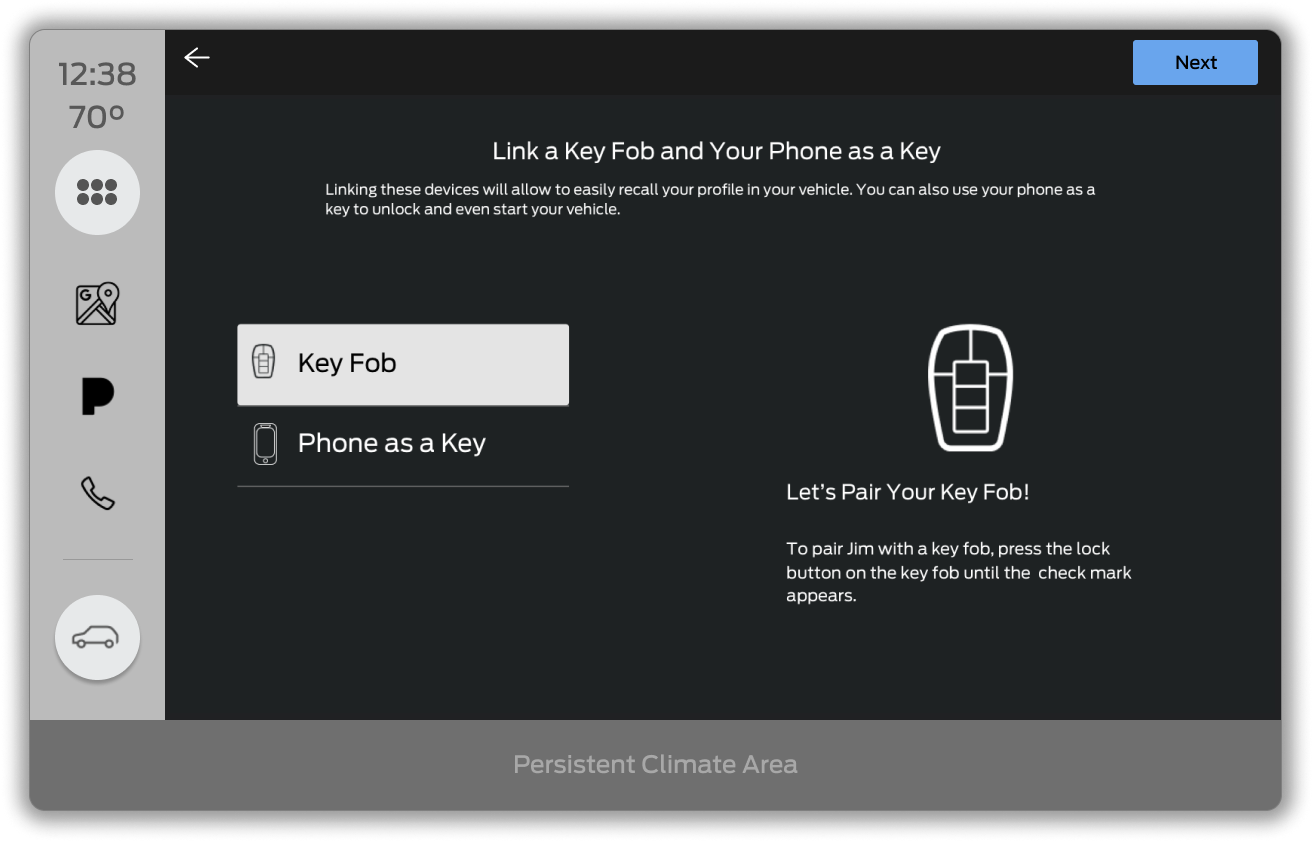
I initially reviewed all existing screens and streamlined them to include only essential elements such as Ford and Google terms and conditions, Ford login, Google login, username, avatar, fob linking, phone-as-a-key linking, Bluetooth, and positional setup. This assessment helped to identify which screens were crucial for a basic profile and which could be simplified or removed.
While this revision improved the process, my team and I recognized that the setup was still too lengthy. To expedite the setup, we leveraged our partnership with Google to enable users to sign into their FordPass and/or Google accounts, pre-populating basic information. We refined a concept from the Rocket Setup team by introducing "basic," "suggested," and "advanced" setup tiers. We opted for a streamlined 5-screen basic setup, which was followed by a "Choose Your Own Adventure" screen, allowing users to select or skip specific features for setup, with the option to configure them later in settings.


Numerous Required Screens Were Reduced Into One "Choose Your Own Adventure" Screen
With a clearer path for streamlining the setup process, I identified user pain points and gaps by examining common scenarios. Typical storyboards would include flows for:
-
Feature setup
-
Daily use
-
A "day of oops"
-
Etc.
These storyboards used personas and visual wireframes to effectively convey the importance of features to other teams and upper management, leading to the escalation of key issues.
Once the storyboards were finalized, I developed prototypes to provide a comprehensive view of the user experience. My team and I continually reviewed and refined these prototypes with internal teams and stakeholders. We then gathered crucial "real-world" feedback through a design workshop facilitated by Ford's UX research team. Users evaluated our design in bucks (the front half of a vehicle used for realistic testing). We learned that users were confused by the need to agree to both Ford and Google terms and conditions.
In response, we simplified the process by consolidating terms into a single screen for initial agreement and addressed additional permissions as needed. We delivered the refined prototypes to developers and conducted ongoing QA to ensure the coded designs matched our plans, while continuously tweaking the designs for future iterations.
Now/Near/Far Presentations
While working on Personal Profiles, I had to present now/near/far presentations to multiple different groups at Ford. These presentations sought support for new projects or updates. They outlined the project's rationale and roadmap:
-
Now: At the outset, the vehicle's setup featured a memory seat button that recalled seat positions and loaded favorite radio presets and ambient lighting preferences. While functional, this system offered limited personalization, necessitating a more comprehensive solution.
-
Near: For the near-term, we proposed a refined setup process leveraging our partnership with Google. By enabling account sign-ins and introducing "basic," "suggested," and "advanced" setup tiers, we aimed to streamline the user experience. The "Choose Your Own Adventure" screen further allowed users to quickly set up essential features while deferring additional customizations.
-
Far: Looking ahead, our long-term goals focused on expanding personalization capabilities and integrating advanced features. We sought to validate interim solutions and explore options like adaptive seat positions to ensure continued enhancement of the user experience.
The Now/Near/Far presentations provided a clear roadmap of our project’s current state, immediate improvements, and future aspirations, facilitating stakeholder support and alignment throughout the development process.
Outcomes
As a key team member on the Ford Personal Profiles project, I worked alongside a talented group of designers and engineers under the guidance of my manager. This project was my first at Ford, and I quickly adapted to its dynamic, non-linear nature, taking on a range of responsibilities that extended beyond traditional design functions.
My involvement was pivotal in refining the setup process and enhancing the user experience. I played a central role in implementing Google account sign-ins and developing the "Choose Your Own Adventure" screen, which significantly streamlined the setup process. My contributions included managing technical specifications, ensuring alignment between design and code, and participating in iterative feedback and QA processes.
Through this project, I demonstrated my ability to innovate within constraints and collaborate effectively within a cross-functional team. My efforts were integral to the successful delivery of the feature, and I am proud of the enhancements we achieved, which will soon be seen in Ford vehicles, reflecting our commitment to improving user personalization and convenience.
Non-Exhaustive Gallery of Setup Wizard Screens:


Non-Exhaustive Gallery of Setup Wizard Screens: