My Contributions
-
UX Designer & Web Content Analyst
-
Manage ~150 global SharePoint (SPO) sites
-
Implement SPO UX improvements, assign permissions, and ensure basic QA
-
Create & embed Figma prototypes within SPO pages
-
Design graphics and banners
-
Communicate technology updates to global business partners
Project Overview
Throughout my time at GM, I’ve helped modernize the dealer experience. I was initially tasked with migrating approximately 150 global SharePoint sites from SharePoint 2016 to SharePoint Online (SPO), ensuring correct permissions and access for the appropriate users. For roughly 40 of these sites, I also made design and UX improvements to streamline layouts and enhance usability. Beyond migration, I created embedded iframe prototypes on the new SPO pages, designed graphics for the Global Connect Portal, and communicated updates to global Country Business Leads (CBLs) to ensure consistent adoption of changes across GM’s dealer network.


Dealer Experience Modernization
Modernizing GM's Ecosystem For Dealers
I’ve worked to modernize the GM dealer experience by migrating existing SharePoint sites to SharePoint Online, implementing UX improvements where possible, and communicating technology updates to Country Business Leads (CBLs) around the globe.
Design Process
SharePoint Modernization & Interactive Prototypes
GM’s dealer network previously relied on legacy SharePoint 2016 sites to host resources ranging from educational materials and incentive programs to dealership performance rankings. With the 2016 platform being sunset, I helped lead the migration of approximately 150 global sites to SharePoint Online (SPO), ensuring proper permissions and accessibility for the right user groups.
Following migration, I focused on improving usability and visual clarity for about 40 of these sites—redesigning layouts, streamlining content organization, and enhancing the overall user experience. When possible, I analyzed site analytics to inform interface decisions. I prioritized high traffic navigation buttons and web parts, reordering to help users reach high-priority content faster.
While SPO offers a more modern look and feel, it imposes design constraints and has limited customizability as it no longer allows for HTML/CSS overrides. To address pages that require interactivity beyond the platform’s default features, I have created prototypes with Figma, ultimately displaying them on SPO pages via embedded iFrames. One of the most impactful examples is the Azure/MFA Support page, used globally by dealers to troubleshoot login and authentication issues. I created a “stepper” that guides users to the correct help documentation based on their needs, reducing confusion and improving self-service efficiency. These prototypes add dynamic functionality without requiring custom code, while still maintaining visual consistency across the ecosystem.

SPO Screen + Flow of Azure/MFA Stepper
Certain Selections Open Help Documents in Separate Tabs
Visual Design for the Global Connect Portal (GCP)
While my primary focused was the SharePoint migration, GM's Dealer Experience team was actively developing a modernized version of their dealer hub—Global Connect Portal (GCP). GCP is a centralized platform where dealers can access apps, training guides, news, and corporate updates.

Global Connect Portal Homepage
During its initial launch, I began supporting GCP by verifying that no bugs occurred and calling out usability issues. Following the initial release, I began splitting my time between SharePoint and GCP initiatives. My efforts have centered on designing various graphics and homepage banners to communicate technology updates, new tool releases, and other important information for dealers. These visuals help draw attention to high-priority content and improve discoverability of key information for global users.


Various Graphics + Banner Images That I've Designed


Various Graphics + Banner Images That I've Designed
Global Collaboration & Platform Alignment
While at GM, I’ve continuously collaborated with our Country Business Leads (CBLs)—key representatives who act as points of contact for their respective regions around the world. CBLs periodically reach out to my team with dealer access and usability issues that fall outside standard support, and we work alongside our IT team to identify root causes and coordinate solutions. These partnerships not only ensure timely resolutions but also reveal recurring pain points that help guide broader UX and process improvements. As part of this relationship, I’ve prepared and delivered three major global update presentations (six sessions total across time zones), providing visibility into recent enhancements and upcoming initiatives so regional teams can anticipate changes and support their dealers effectively.


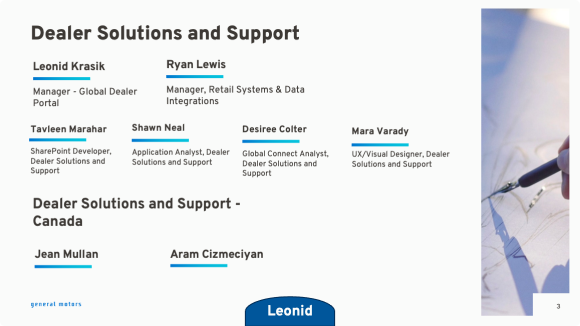


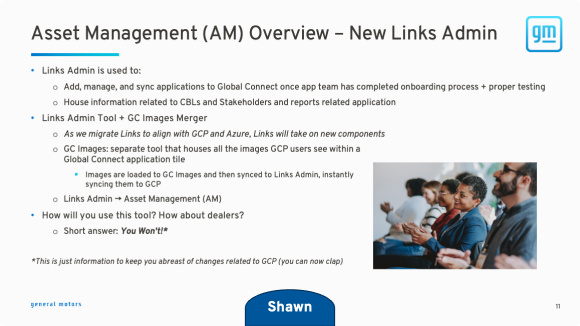
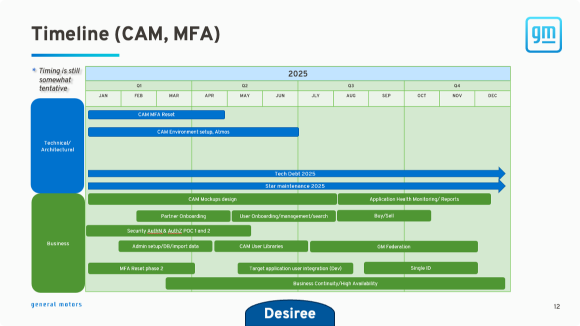


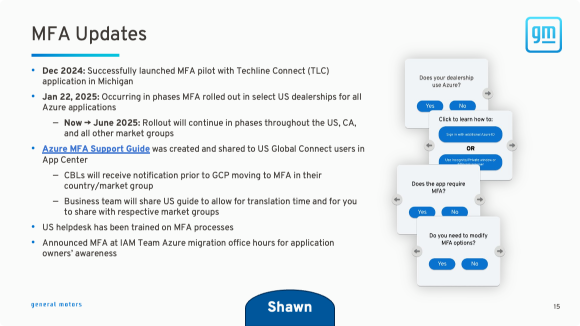


Most Recent (Jan 2025) CBL Presentation
Click to Flip Through Slides
This ongoing collaboration has played a key role in the rollout of Centralized Access Management (CAM), an updated administrative tool launched in October 2025. CAM enables dealer admin users to create and edit accounts, enable MFA, and manage app permissions for their teams. I supported CAM’s global deployment by verifying translation labels for the eight supported languages and ensuring that terminology, interface language, and workflows make sense for users in each market.
By maintaining open communication with regional representatives while contributing directly to CAM’s usability and adoption, I’ve helped bridge the gap between global design vision and real-world user experience—ensuring tools are not only functional, but also intuitive and consistent across markets.

CAM Label Translation Table Page with Available Language Dropdown Open
Outcomes
Modernizing GM's dealer experience continues to reinforce my ability to design effectively within complex systems, improving usability despite technical and legacy constraints. Managing over 150 global SharePoint sites honed how I structure content, organize navigation, and make data-informed design decisions. These efforts continually make the dealer experience more intuitive and efficient, ensuring users can access the tools and information they needed to work effectively.
Collaborating with Country Business Leads (CBLs) has strengthened my ability to align design decisions with real-world user needs. By addressing individual dealer access and usability issues, I'm able to identify recurring pain points that inform broader UX improvements. Maintaining transparent communication and confirming understanding encourages successful adoption of new technology. This in turn fosters a more collaborative and effective work environment.
These experiences have reinforced the value of designing with both scale and context in mind. Moving forward, I will continue creating solutions that balance platform constraints with real-world user needs, making tools functional, usable, scalable, and intuitive for their respective audiences.